Calculate distance between coordinates from latitude and longitude, with Haversine great-circle distance, initial and final bearing, midpoint, and km, miles.
Last updated
Coordinate distance calculator Enter two latitude and longitude points to measure great-circle distance, initial and final bearing, midpoint, and unit conversions. Decimal degrees and common DMS coordinate formats are accepted.
Quick examples
Long transatlantic great-circle example with a visibly different bearing and midpoint.
Distance
5,570.22 km
3,461.18 miles • 3,007.68 nautical miles. This is the Haversine great-circle distance between the two coordinates.
Metres
5,570,222.18
Feet
18,275,007.74
Initial bearing
51.21° NE
Final bearing
108.33° ESE
Midpoint decimal degrees
52.3684, -41.2903
Midpoint DMS
52° 22' 6.24" N, 41° 17' 25.08" W
Reverse bearing from B to A
288.33°
Route-distance caution This is a coordinate-to-coordinate great-circle measurement. Road distance, walking distance, shipping distance, and flight-planning distance may be longer or follow different constraints.
Coordinates distance calculator: great-circle distance, bearing, and midpoint
Use the coordinates distance calculator to measure great-circle distance between two latitude and longitude points, then review the result in kilometres, miles, nautical miles, metres, and feet alongside the initial bearing, final bearing, and midpoint.
What this calculator is measuring
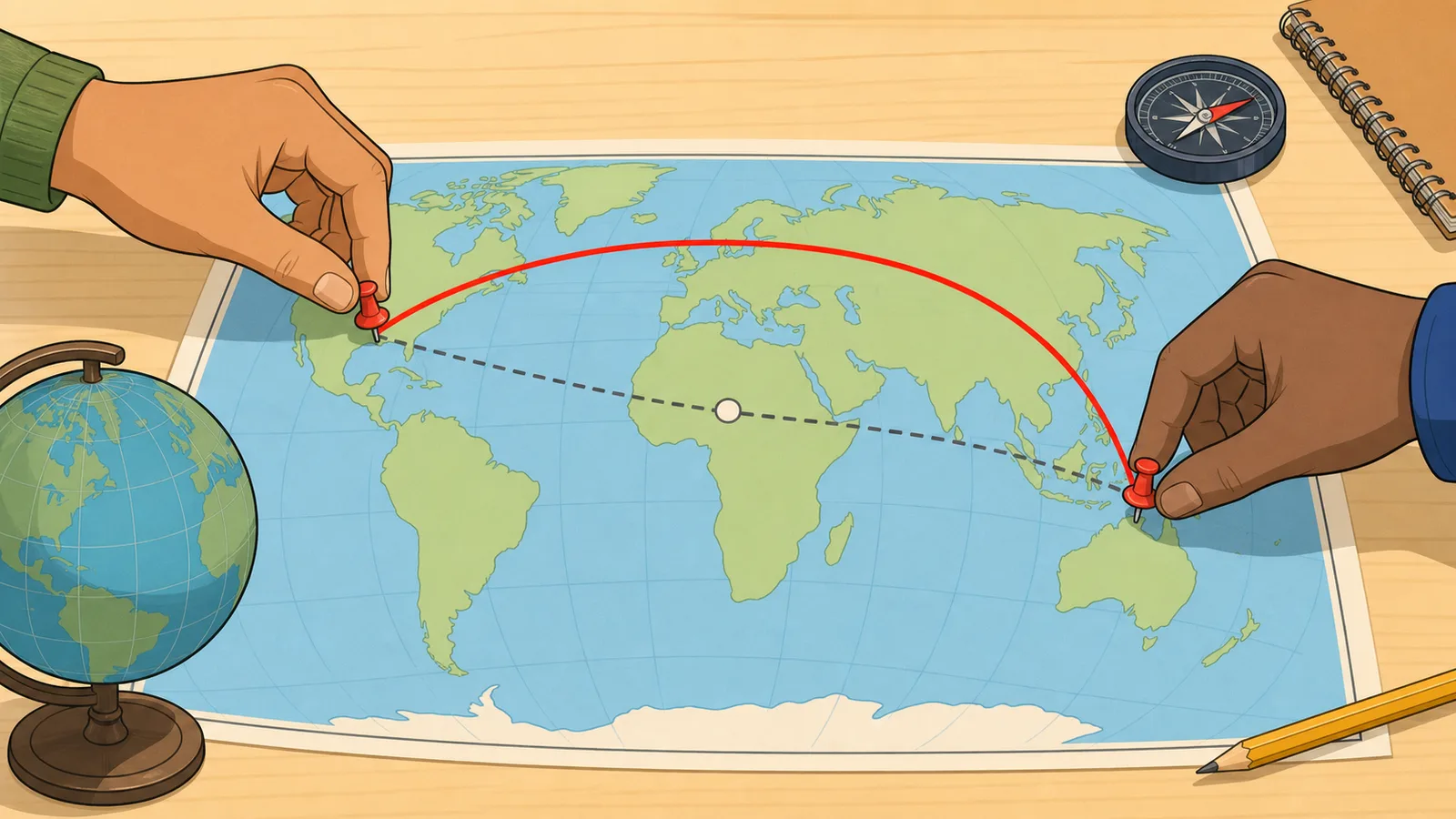
This page measures the shortest path across the Earth's surface between two geographic coordinates. That path is called the great-circle distance. It is different from a road distance, flight timetable distance, or shipping route distance because those real routes may curve for infrastructure, airspace, weather, terrain, or legal constraints.
The calculator also returns the initial bearing and geographic midpoint. The initial bearing is the direction you would set out from the first point when following the great-circle path. The midpoint is the halfway coordinate on that same spherical route rather than the simple arithmetic average of the two latitude and longitude values.
How the Haversine method works
The core distance calculation uses the Haversine formula, a standard spherical-navigation method for estimating great-circle distance from latitude and longitude. The calculator converts both coordinate pairs into radians, finds the central angle between them, and multiplies that angle by an Earth-radius constant to obtain the distance.
That makes the page fast and reliable for everyday travel, mapping, and educational use. It is especially useful when you need a clean cross-check in km, miles, or nautical miles without pulling in a full routing engine.
a = sin²(Δφ/2) + cos φ₁ cos φ₂ sin²(Δλ/2)
Intermediate Haversine term from latitude and longitude differences.
d = 2R atan2(√a, √(1-a))
Great-circle distance from the central angle and Earth radius R.
Decimal degrees and DMS inputs
You can enter plain decimal coordinates such as 40.7128 and -74.0060, direction-suffixed decimal coordinates such as 41.8781N or 87.6283W, or degree-minute-second values such as 41°52'41.2"N. The parser converts those formats into decimal degrees before running the distance calculation, which helps when one source uses map-style notation and another uses spreadsheet-style values.
Latitude must stay between -90 and 90 degrees, and longitude must stay between -180 and 180 degrees. If a coordinate falls outside those limits, the calculator correctly rejects it instead of producing a misleading distance.
Bearing, final bearing, and midpoint
Competitor latitude longitude distance calculators often stop after distance, but the useful navigation question is usually directional as well: which way do you initially head, and how does that heading change along a curved great-circle path? This page now shows both the initial bearing leaving Point A and the final bearing arriving at Point B, plus simple compass-point labels that make the degree headings easier to scan.
The final bearing matters because a great-circle route is not a straight line on most flat maps. On a long route, the bearing you start with can differ materially from the direction you are travelling as you approach the destination. That distinction is especially useful when comparing a Haversine distance calculator result against a map, aviation example, or navigation exercise.
The midpoint shown here is also computed on the spherical great-circle path rather than by averaging the two latitudes and two longitudes. Averaging can place the midpoint away from the surface route, particularly on long east-west routes or paths that cross high latitudes.
Presets, swap direction, and shareable coordinates
The calculator includes ready-made coordinate pairs for common long-distance examples so you can quickly see how latitude, longitude, bearing, and midpoint outputs behave. The swap button reverses Point A and Point B without retyping, which is useful because the distance stays the same while the bearing context changes.
Inputs are also mirrored into the page URL after hydration. That makes it easier to save or share a particular distance between GPS coordinates, a map coordinate pair, or a classroom example without relying on screenshots or manual transcription.
What this page does not account for
This calculator uses a spherical-Earth approximation. For most practical consumer uses that is close enough, but it is not the same as a higher-precision ellipsoidal geodesic model used in specialist surveying or geodesy tools.
It also does not know anything about roads, airways, borders, currents, elevation, or no-go zones. Use it for geographic separation and heading estimates, not as a replacement for turn-by-turn navigation, dispatch planning, or regulated aviation and marine routing software.
Frequently asked questions
What is the difference between great-circle distance and driving distance?
Great-circle distance is the shortest path across the Earth's surface between two coordinates. Driving distance follows roads and usually ends up longer because roads curve, detour, and obey the built transport network.
Why does the calculator show nautical miles?
Because nautical miles are standard in marine and aviation navigation. They are directly tied to geographic coordinates, which makes them a natural output when working from latitude and longitude rather than from roads or rail routes.
Can I paste coordinates in DMS format?
Yes. The calculator accepts degree-minute-second entries such as 41°52'41.2"N, spaced DMS values such as W 87 37 42, direction-suffixed decimal coordinates such as 41.8781N, and ordinary signed decimal degrees. It converts valid inputs into decimal coordinates automatically before computing distance, bearing, and midpoint.
Why are the initial bearing and final bearing different?
A great-circle route curves across the surface of a sphere, so the direction you initially head from Point A is not always the same direction you are travelling as you arrive at Point B. The calculator shows the initial bearing, final bearing, and simple compass labels so a latitude longitude distance calculator result is easier to interpret for navigation and map-reading tasks.
Can I share a coordinates distance calculation?
Yes. After the calculator hydrates in the browser, the four coordinate inputs are stored in the page URL. You can copy that URL to reopen the same distance between coordinates later, including decimal degree and DMS-style examples.
Why might a professional mapping system give a slightly different answer?
Many professional tools use an ellipsoidal Earth model or a different Earth-radius assumption, while this page uses the Haversine method on a sphere for speed and clarity. Small differences are therefore expected, especially on very long routes.