Estimate CMU block count, wall coverage, mortar-bed volume, and mortar bags from wall dimensions, openings, joint thickness, waste, block preset.
Last updated
Concrete block wall estimate Estimate block count, wall area, and mortar-bed volume from wall dimensions, openings, waste allowance, and a common block preset. This page stays focused on block mortar planning so it does not compete with the concrete block calculator page that owns the broader wall takeoff intent.
Quick examples
Result
184 blocks
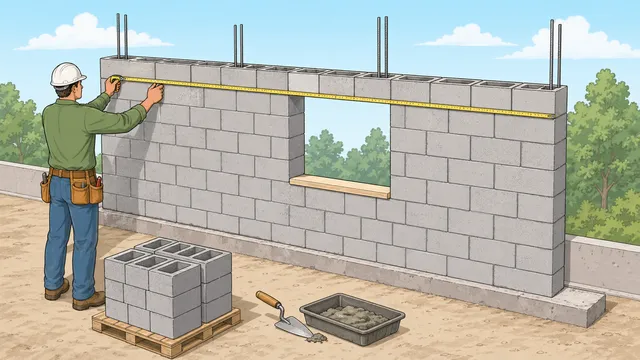
Estimated block count after openings deduction and waste allowance, based on a 6,000 mm wall length and 2,400 mm wall height.
Gross wall area
14.4 m²
Net wall area
14.4 m²
Estimated courses
11.43
Blocks per course
14.63
Mortar-bed volume (m³)
0.137 m³
Mortar bags
12 bags
Block module
410 mm × 210 mm
Blocks per area
11.61 blocks/m²
Ordering note
Use the block count for procurement and the block-per-area figure as a quick check against standard CMU coverage before you place the order.
Mortar planning note
The mortar-bed volume and bag count are planning estimates only. Match the actual mortar type and bag yield to the specification or supplier guidance before ordering.
How to use this result
Use the block count for ordering, the area figures to sanity-check the wall layout, and the mortar-bed volume to plan joint material before construction. Confirm block type, bond pattern, and structural requirements with your spec or code.
When you compare against a concrete block calculator, remember that the extra block-size module and mortar-joint thickness are what make this page useful for mortar planning rather than a bare wall-count estimate.
A block mortar calculator helps you estimate how many concrete blocks a wall will need, how much mortar-bed volume the layout implies, and how many mortar bags that volume suggests when you enter the yield from the product label.
What this block and mortar calculator covers
A concrete block wall is usually estimated from module size rather than raw block size alone. The module includes the block dimensions plus the mortar joint, because that combined face module is what determines the number of units needed across the wall and up the courses.
That is why a concrete block estimator can do more than return a simple unit count. It can also show gross wall area, net wall area after openings, approximate courses, blocks per course, and an indicative mortar-bed volume so you can compare the wall geometry against the material order.
The same logic makes the page useful when you are comparing a block mortar calculator against a broader concrete block calculator. The broader wall calculator can cover the total takeoff, while this page keeps the focus on mortar planning and wall-coverage module checks.
Core CMU estimating formulas
The calculation begins with gross wall area and opening deductions. It then builds the working module from the selected block dimensions and mortar joint thickness, divides the net wall area by that module area, and applies waste after the base unit count is found.
Gross area = Wall length x Wall height
This is the full wall face before deducting doors, windows, or other voids.
Module area = (Block length + Joint) x (Block height + Joint)
Concrete block quantity is estimated from the module size because joints affect both the horizontal and vertical coverage.
Blocks before waste = Net area / Module area
The base block count comes from dividing the usable wall area by the face area of one block-and-joint module.
Blocks per unit area = 1 / Module area
This gives a quick wall-coverage check in blocks per square metre or blocks per square foot, depending on the selected unit mode.
Block order = ceil(Blocks before waste x (1 + Waste%))
Waste is added after the base estimate so the final order reflects handling loss, cuts, and breakage.
How to use the mortar volume result
The mortar-bed result is best treated as a planning figure rather than a mix-design instruction. It helps you understand whether the wall is a small job, a moderate masonry run, or a larger section where staging and supply will matter, but it does not replace the actual mix and bag-yield data from the product you plan to use.
The optional bag estimate is only as reliable as the mortar yield entered on the page. Bagged mortar products can differ by mix, bag size, water content, joint profile, and site waste, so the safest workflow is to read the product yield first, enter that volume per bag, and then round up again if the wall has awkward cuts, returns, or staging losses.
That is also why the block preset matters. A deeper or thicker block changes the wall build-up and the joint volume, while a different module length or height changes both courses and unit count. Matching the preset to the actual block specified for the project makes the estimate much more useful.
Standard CMU sizes and wall coverage
A standard CMU wall is often discussed in nominal sizes such as 8 x 8 x 16, but the module area is what matters for estimating. That module changes once you add the mortar joint thickness, which is why the selected preset can move the result even when two blocks look similar by eye.
Half blocks and partition blocks also change the wall coverage. If you switch from a standard block preset to a half block or a thinner partition block, the estimate will usually move because the calculator is solving the wall from the actual module, not from a generic wall-face rule of thumb.
The blocks-per-area readout is a useful coverage check. If that figure looks off, the preset or joint thickness is usually the first thing to verify before you order.
Standard block preset: useful for typical CMU wall estimating
Half block preset: useful when alternating with a standard wall run or closing a course
Partition block preset: useful when the wall is thinner than a structural CMU wall
Deep block preset: useful when the wall uses a thicker masonry unit
Mortar planning, waste, and bag sizing
The mortar-bed volume is a planning figure, and the bag estimate depends on the yield you enter from the product label. Mortar bag yield varies by product, so the safest way to use this number is as a comparison point when you are deciding how much material to order or whether the wall is large enough to justify comparing a bagged mix against a supplier quote.
Waste allowance still matters because block walls rarely go up without cuts, corner adjustments, or minor breakage. A modest waste percentage helps keep the order from coming up short, especially when openings split the wall into smaller runs or when the layout includes returns and short infill sections.
Worked example: standard CMU wall
A 6 m by 2.4 m wall with 1.2 m² of openings, a 10 mm mortar joint, a 10% waste allowance, and the standard block preset returns 169 blocks, 13.2 m² of net wall area, and about 0.126 m³ of mortar-bed volume. The same result also shows a blocks-per-area figure that helps you sanity-check the chosen preset.
That result is more useful than the gross wall area alone because it already reflects the openings deduction and the wall module created by the selected block size. If you switch to a different block preset, the course count, blocks per course, and mortar volume will all shift with the module.
What this result does not cover
This tool is not a full masonry takeoff. It does not include bond beam units, corner blocks, reinforcement, grout fill, movement joints, special shapes, lintels, or structural design requirements. It also treats openings as simple area deductions rather than full detailing conditions.
Use it as a planning estimate for standard wall runs, then confirm the final block, mortar, and reinforcement quantities from the project drawings and specification.
If the wall has corners, returns, or short infill sections, split the layout into separate runs so each section can be checked on its own before you total the order.
When to switch calculators
Use the concrete block calculator when you want the broader wall takeoff and the block count is the main question. Use the concrete block fill calculator when the question shifts to core fill or grout inside the block wall. Use the footing calculator when you need the foundation concrete under the wall rather than the wall masonry above it.
This page stays focused on the mortar-planning side of the wall job so it can answer block mortar calculator and CMU wall coverage queries without blurring into the fill or footing calculators.
Frequently asked questions
How many concrete blocks do I need for a wall?
A block calculator estimates that from the net wall area and the module area of one block plus mortar joint. Once the base count is known, a waste allowance is added to arrive at the order quantity.
Does the mortar joint change the block estimate?
Yes. Joint thickness affects the module length and module height, which changes both blocks per course and the number of courses over the full wall height.
What does the mortar-bed volume mean?
It is a planning estimate of the joint material implied by the wall geometry and selected block preset. It is useful for early material planning, but it is not a substitute for the actual mortar mix yield on the product you buy.
Can I deduct openings from a block wall estimate?
Yes. Deducting the total opening area gives a more realistic net wall area, which usually reduces both the base block count and the waste-adjusted order quantity.
How many blocks are in a square foot?
The exact figure depends on the block preset and mortar joint thickness because the calculator uses module area rather than bare block size alone. A standard CMU module usually lands close to one block per square foot, but the safest answer is the blocks-per-area readout for the preset you actually chose.
Is a cinder block the same as a concrete block?
People often use the names interchangeably, but modern concrete masonry units are the more accurate term. This calculator is built around CMU-style block dimensions and mortar joints rather than a loose nickname.
What block preset should I choose?
Choose the preset that matches the real block you plan to use. A standard wall run usually uses the standard preset, a short closure or alternating course may use the half block preset, thinner internal walls can use the partition preset, and thicker masonry units can use the deep preset.
Does this calculator estimate mortar bags?
Yes, when you enter a mortar yield per bag. The calculator divides the estimated mortar-bed volume by that product-specific yield and rounds up, but the result should still be checked against the bag label, supplier guidance, and site waste.
What mortar yield per bag should I enter?
Use the yield printed on the mortar bag or supplier data sheet in the same unit mode as the calculator. If you do not know the yield yet, enter 0 and use the mortar-bed volume as the planning figure until the product is selected.
Can I use this for load-bearing or retaining walls?
You can use it for the material takeoff, but not for structural design. Load-bearing and retaining walls can require reinforcement, grout, and other details that need to come from the drawings or an engineer.
Do corners and returns need separate counts?
Yes. Corners, returns, and other layout changes are easier to manage when you split the wall into separate runs and total them after each section is solved. That keeps the waste allowance and openings deduction easier to check.
Why does mortar joint thickness matter so much?
Because the joint changes the wall module in both directions. Even a small change in joint thickness alters the blocks-per-area figure, the blocks per course, and the final wall coverage.