Skip to content
Calcipedia
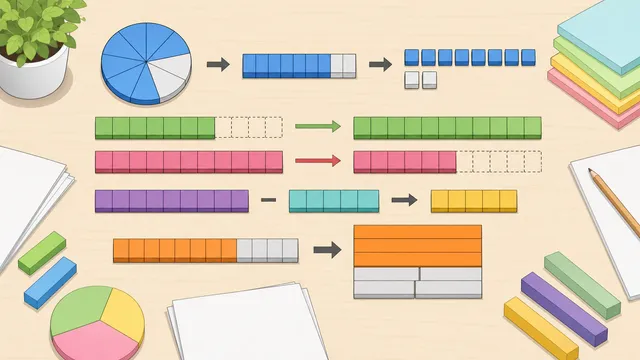
Fraction Calculator instructional illustration

Fraction Calculator

Add, subtract, multiply, divide, simplify, compare, convert, and solve fractions with one fraction calculator covering mixed numbers, improper fractions.

Last updated

Fraction workflows

Choose the fraction problem first

Use one fraction calculator for adding fractions, subtracting fractions, multiplying fractions, dividing fractions, simplifying fractions, comparing fractions, finding equivalent fractions, least common denominator work, fraction-to-decimal, fraction-to-percent, fraction-to-ratio, mixed-number conversion, improper-fraction conversion, and unknown-fraction proportions.

Keep the denominator rule visible A denominator cannot be zero. Addition and subtraction usually need a least common denominator, while multiplication works straight across and division uses the reciprocal of the second fraction.

Active workflow

Add, subtract, multiply, divide

Use two fractions with the four core operations and show simplified, mixed-number, and decimal results.

First fraction
Second fraction

1 1/4

Simplified result

1.25

Decimal value

Improper fraction5/4
OperationAdd
Mixed number1 1/4
StepWorkingWhy
Normalize inputs1/2 and 3/4Signs are kept in the numerator and denominators are made positive before calculating.
Use a common denominator(1 x 4 + 3 x 2) / (2 x 4) = 10/8Addition needs equal-sized parts before the numerators can be combined.
Simplify by 25/4Divide numerator and denominator by their greatest common divisor.

Fraction workflow guide

WorkflowUse it forWatch for
Core arithmeticAdding, subtracting, multiplying, or dividing two fractionsAddition and subtraction need a common denominator; multiplication and division do not.
Simplifying and equivalent fractionsReducing to lowest terms, checking equivalent fractions, and building matching denominatorsEquivalent fractions look different but reduce to the same value.
Fraction conversionsChanging a fraction into a decimal, percentage, ratio, mixed number, or improper fractionRepeating decimals are rounded for display but the fraction remains exact.
Unknown fraction solvingSolving proportions such as a/b = c/d when one value is missingExactly one field should be blank, and no denominator can be zero.
← All Fractions calculators

Fraction Calculator

Fraction calculator for adding, subtracting, simplifying, converting, and mixed numbers

Choose the workflow first so the calculator applies the right denominator rule, conversion rule, or cross-multiplication method. This page also explains the main assumptions behind the fraction calculator for adding, subtracting, simplifying, converting, and mixed numbers result, highlights the supporting figures shown by the calculator, and helps the reader use the estimate without overstating what a quick online tool can prove.

Start with the fraction question

A fraction can be part of a whole, a division statement, a ratio, a comparison, or a step inside a larger calculation. That is why a single fraction calculator needs more than one panel. The right workflow depends on whether you are doing arithmetic, simplifying, comparing, converting, or solving a missing value.

The consolidated calculator keeps long-tail fraction intents on the page instead of scattering them across thin pages. Old specialist URLs now map to anchored workflows on the master calculator, while the tool itself still preserves the focused input labels and result interpretation that users expect from a fraction simplifier, adding fractions calculator, mixed number calculator, or fraction to decimal calculator.

The main arithmetic panel now keeps the working visible even for the quick add, subtract, multiply, and divide workflow. That makes it easier to check whether the calculator used a least common denominator, straight-across multiplication, reciprocal division, or a final greatest-common-divisor reduction before you copy the answer into homework, a recipe adjustment, or another calculation.

  • Use Add, subtract, multiply, divide for two-fraction arithmetic with simplified, improper, mixed-number, and decimal results.
  • Use Adding fractions or Subtracting fractions when you need least-common-denominator steps.
  • Use Simplify fractions, Equivalent fractions, or Least common denominator when the task is rewriting rather than calculating a new value.
  • Use Fraction to decimal, Fraction to percent, or Fraction to ratio when the same value needs a different format.
  • Use Mixed-number and improper-fraction panels when whole-number parts and fractional parts need to move between forms.
  • Use Solve an unknown fraction when one numerator or denominator is missing from a proportion.

Adding fractions

Adding fractions requires equal-sized parts. If the denominators already match, add the numerators and keep the denominator. If the denominators are different, rewrite each fraction over a common denominator first, then add the adjusted numerators.

The adding fractions workflow accepts two or more fractions, finds the least common denominator, rewrites each fraction as an equivalent fraction, adds the numerators, and simplifies the answer. This is the best panel for searches such as adding fractions calculator, add fractions with unlike denominators, and adding fractions with steps.

a/b + c/d = (ad + bc) / bd

A general common-denominator formula for adding two fractions.

1/2 + 1/3 = 3/6 + 2/6 = 5/6

The denominators are rewritten to sixths before the numerators are added.

Subtracting fractions

Subtracting fractions uses the same denominator idea as addition. The parts must be on the same scale before one numerator can be subtracted from the other. A negative result is valid when the second fraction is larger than the first.

Use the subtracting fractions workflow when the main task is difference with steps. It shows the least common denominator used, the simplified fraction, decimal value, and mixed-number form when useful.

a/b - c/d = (ad - bc) / bd

A general common-denominator formula for subtracting two fractions.

3/4 - 1/6 = 9/12 - 2/12 = 7/12

Both fractions are rewritten over denominator 12 before subtraction.

Multiplying fractions

Multiplying fractions is more direct than addition or subtraction. Multiply numerator by numerator and denominator by denominator, then simplify the result. A common denominator is not required because multiplication combines the parts rather than comparing same-sized pieces.

The core arithmetic panel handles multiplication alongside addition, subtraction, and division. It is useful for homework checks, recipe scaling, probability products, unit-rate work, and any situation where a fraction of a fraction is needed.

a/b x c/d = ac / bd

Multiply straight across, then reduce to lowest terms.

2/3 x 3/5 = 6/15 = 2/5

The product is simplified by dividing numerator and denominator by 3.

Dividing fractions

Dividing by a fraction means multiplying by its reciprocal. The reciprocal swaps the numerator and denominator of the divisor. The second fraction cannot be zero because division by zero is undefined.

Use the divide operation in the core arithmetic panel when you need a fraction division calculator. The result is shown as an improper fraction, mixed number, and decimal so you can choose the form that fits the next step.

a/b divided by c/d = a/b x d/c

Invert the second fraction and multiply.

3/4 divided by 2/5 = 3/4 x 5/2 = 15/8 = 1 7/8

The quotient can be displayed as an improper fraction or a mixed number.

Simplifying fractions

A simplified fraction, also called a fraction in lowest terms, has no common factor greater than 1 in the numerator and denominator. Simplifying does not change the value; it only rewrites the fraction in a cleaner form.

The fraction simplifier divides both parts by their greatest common divisor. For example, 18/24 simplifies to 3/4 because the greatest common divisor is 6. The same simplification step is also used after fraction arithmetic, mixed-number conversion, and fraction-to-ratio conversion.

Simplified fraction = (numerator / GCD) / (denominator / GCD)

Divide both parts by the greatest common divisor.

Comparing fractions and equivalent fractions

Two fractions can be compared by converting to decimals, rewriting over a common denominator, or cross-multiplying. Rewriting over a common denominator is especially helpful when the fractions are close and you want to see the adjusted numerators side by side.

Equivalent fractions are different fraction labels for the same value. For example, 2/3, 4/6, and 8/12 are equivalent because they simplify to the same fraction. The equivalent fractions workflow can simplify a fraction, generate a matching fraction with a target denominator, and check whether a second fraction represents the same value.

a/b = c/d when ad = bc

Cross-multiplication checks whether two fractions are equivalent.

a/b > c/d when ad > bc

Cross-products can compare positive fractions without first finding decimals.

Least common denominator

The least common denominator is the least common multiple of the denominators. It is the smallest denominator that all entered fractions can share, so it keeps equivalent fractions as small as possible before adding, subtracting, or comparing.

Use the least common denominator calculator when you only need the shared denominator plan. Numerators do not affect the LCD. Each scale factor tells you what to multiply a fraction by so it can be rewritten over the shared denominator.

LCD = LCM(denominator 1, denominator 2, ...)

The least common denominator is the least common multiple of the denominators.

Fraction to decimal, percent, and ratio

A fraction to decimal calculator divides the numerator by the denominator. Some fractions terminate, such as 3/8 = 0.375, while others repeat, such as 1/3 = 0.333... The calculator keeps the exact fraction alongside the decimal so rounding does not hide the original value.

A fraction to percent calculator converts the same decimal to a percentage by multiplying by 100. A fraction to ratio calculator writes the simplified numerator and denominator as a ratio, such as 3/4 becoming 3:4. These conversions are useful for grades, recipes, probability, scaling, and comparing values in different formats.

Decimal = numerator / denominator

Basic fraction-to-decimal conversion. This is the specific relationship the calculator applies when building the result.

Percent = (numerator / denominator) x 100

Fraction-to-percent conversion. This is the specific relationship the calculator applies when building the result.

a/b as a ratio = a:b after simplification

Fraction-to-ratio conversion. This is the specific relationship the calculator applies when building the result.

Mixed numbers and improper fractions

A mixed number combines a whole number with a proper fraction, such as 2 3/4. An improper fraction has a numerator greater than or equal to its denominator, such as 11/4. They can represent the same value in different forms.

To convert a mixed number to an improper fraction, multiply the whole number by the denominator, add the numerator, and keep the denominator. To convert an improper fraction to a mixed number, divide the numerator by the denominator to find the whole part and remainder.

The mixed-number arithmetic workflow handles add, subtract, multiply, and divide operations by converting mixed numbers through improper fractions, then simplifying the final result back into mixed-number and decimal form.

w n/d = (w x d + n) / d

Convert a mixed number to an improper fraction.

n/d = whole remainder/d

Divide numerator by denominator to convert an improper fraction to a mixed number.

Solving an unknown fraction

An unknown fraction problem usually has the form a/b = c/d with one missing value. If exactly one value is blank, cross-multiplication can solve the missing numerator or denominator.

Use the solve unknown fraction workflow for equivalent-fraction and proportion problems. It shows the completed proportion, decimal value, cross-products, and step-by-step working so you can see why the missing value fits.

a/b = c/d means ad = bc

Cross-multiplication is the basis for solving a missing fraction value.

What stayed separate

This consolidation covers general fraction arithmetic, simplification, comparison, conversion, and proportion solving. Domain calculators stay separate when they add specialised assumptions or units. Decimal to fraction, inch fraction, ratio to fraction, percent to fraction, long division, and measurement-specific tools may still have distinct intent because the starting input or use case is different.

The goal is to reduce overlapping fraction pages without stripping useful long-tail coverage. The canonical fraction calculator now contains sections for the major fraction operations and conversion tasks, while redirects preserve old URLs and send users to the matching anchored workflow.

Frequently asked questions

What is the best fraction calculator to use?

Use the workflow that matches the task. Use the core arithmetic panel for add, subtract, multiply, and divide. Use the specialist panels for adding fractions with steps, subtracting fractions with steps, simplifying, comparing, equivalent fractions, least common denominator, conversions, mixed numbers, improper fractions, or unknown proportions.

How do I add fractions with different denominators?

Find a common denominator, rewrite each fraction over that denominator, add the adjusted numerators, and simplify. The least common denominator keeps the rewritten fractions as small as possible.

How do I subtract fractions with unlike denominators?

Rewrite both fractions over a common denominator, subtract the adjusted numerators, keep the common denominator, and reduce the result to lowest terms.

How do I multiply fractions?

Multiply numerator by numerator and denominator by denominator, then simplify. A common denominator is not needed for multiplication.

How do I divide fractions?

Multiply the first fraction by the reciprocal of the second fraction. The reciprocal swaps the numerator and denominator of the divisor.

Can this fraction calculator show the steps?

Yes. The core arithmetic panel shows the normalized inputs, the operation rule used, and the final simplification step. Specialist panels add more context where needed, such as least common denominator steps for adding and subtracting fractions or cross-products for equivalent fractions and unknown proportions.

How do I simplify a fraction?

Find the greatest common divisor of the numerator and denominator, then divide both parts by it. The value stays the same, but the fraction is written in lowest terms.

What is a least common denominator?

The least common denominator is the least common multiple of the denominators. It is the smallest shared denominator that lets fractions be rewritten on the same scale.

How do I compare two fractions?

You can compare fractions by converting both to decimals, rewriting them over a common denominator, or cross-multiplying. For positive fractions, a/b is greater than c/d when ad is greater than bc.

What are equivalent fractions?

Equivalent fractions are different numerator-denominator pairs that represent the same value. For example, 2/3, 4/6, and 8/12 are equivalent because they reduce to the same simplest form.

How do I convert a fraction to a decimal?

Divide the numerator by the denominator. Some fractions terminate, while others repeat. The exact fraction remains useful when the decimal must be rounded.

How do I convert a fraction to a percent?

Divide the numerator by the denominator, then multiply by 100. For example, 3/4 equals 0.75, so it becomes 75%.

How do I convert a fraction to a ratio?

Simplify the fraction, then write the numerator and denominator with a colon. For example, 6/8 simplifies to 3/4, so the ratio is 3:4.

What is the difference between an improper fraction and a mixed number?

An improper fraction has a numerator greater than or equal to its denominator. A mixed number separates the whole-number part from the remaining proper fraction. For example, 11/4 and 2 3/4 represent the same value.

How do I convert a mixed number to an improper fraction?

Multiply the whole number by the denominator, add the numerator, and keep the denominator. For example, 2 3/4 becomes (2 x 4 + 3)/4 = 11/4.

How do I solve for an unknown fraction value?

Set up the proportion a/b = c/d, leave exactly one value blank, and use cross-multiplication. The calculator solves the missing numerator or denominator and shows the completed proportion.

Guides

Featured in articles

Step-by-step guides that use this calculator to solve real problems.

Also in Fractions

Related

More from nearby categories

These related calculators come from the same leaf category, nearby sibling categories, or the same top-level topic.