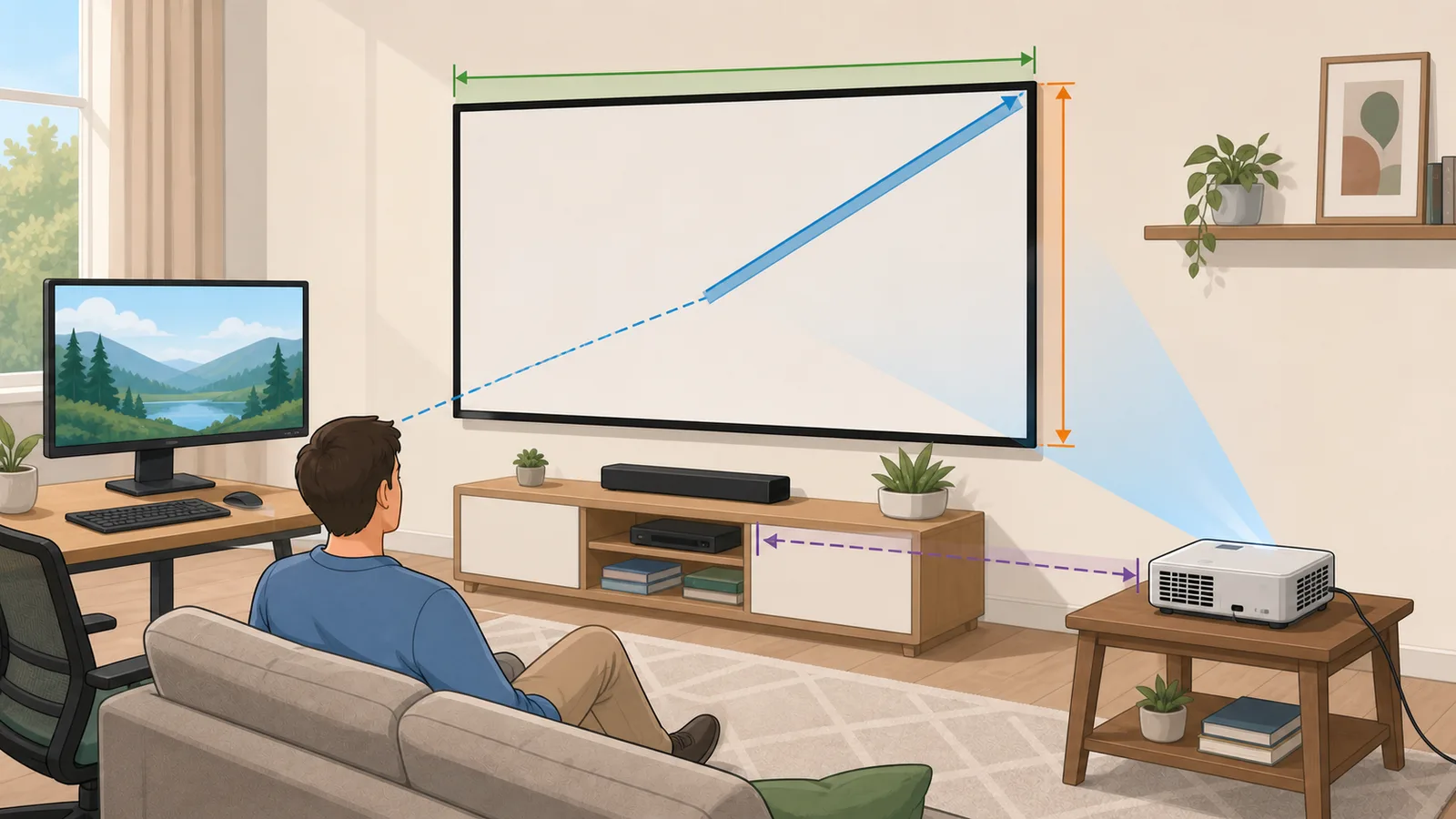
Calculate display dimensions, pixel density, TV viewing distance, and projector throw setup in one screen, monitor, TV, and PPI planning tool.
Last updated
Display, TV, monitor, PPI, and projector planning in one place Use this display calculator to solve physical screen dimensions, pixel density, TV viewing distance, and projector throw geometry without switching between separate display tools.
Calculate physical display width, height, diagonal, area, aspect ratio, and opening fit.
Switch modules when the question changes Start with screen size for physical dimensions, then move to PPI, TV viewing distance, or projector throw when sharpness, seating distance, or room depth becomes the limiting factor.
Display specs
Calculate display width, height, and area from diagonal size and aspect ratio
Enter a screen diagonal, width, or height with an aspect ratio to estimate the physical display dimensions of a TV, monitor, tablet, or phone.
Known measurement
Aspect ratio
:
Common diagonal presets
Planning note
Diagonal size alone does not tell you whether a display will physically fit. Use the width or height modes when a shelf opening, wall bay, or monitor-arm clearance is the known constraint.
Fit check opening
Compare the active display size against a shelf, wall bay, cabinet, monitor-arm span, or projector-screen frame before adding bezel and cable clearance.
Result
23.53 in × 13.24 in
A 27-in 16:9 display is about 23.53 in wide and 13.24 in tall.
Width (in)
23.53
Height (in)
13.24
Width (cm)
59.77
Height (cm)
33.62
Known diagonal
27 in / 68.58 cm
Diagonal
27 in / 68.58 cm
Aspect ratio
16:9
Area
311.5 in² / 2,009.68 cm²
Fit check
The visible screen fits the checked opening
Fits the checked opening with 6.47 in width clearance and 4.76 in height clearance.
Width clearance
6.47 in
Height clearance
4.76 in
Common screen sizes at 16:9
Use this chart to compare the physical width, height, and area of popular monitor and TV diagonals using the same aspect ratio.
Diagonal
Width
Height
Area
Area vs active
Typical use
24"
20.92 in
11.77 in
246.12 in²
-20.99%
Compact monitor
27"
23.53 in
13.24 in
311.5 in²
+0%
Common desk monitor
32"
27.89 in
15.69 in
437.55 in²
+40.47%
Large monitor or small TV
43"
37.48 in
21.08 in
790.08 in²
+153.64%
Small living-room TV
55"
47.94 in
26.96 in
1,292.58 in²
+314.95%
Popular TV size
65"
56.65 in
31.87 in
1,805.34 in²
+479.56%
Large TV comparison point
Same diagonal, different ratios
These comparison rows keep the same diagonal but show how the physical footprint changes across common aspect ratios.
Aspect ratio
Width
Height
Use case
16:9
23.53 in
13.24 in
Standard widescreen TV and monitor format.
16:10
22.9 in
14.31 in
Slightly taller productivity-oriented format.
3:2
22.47 in
14.98 in
Taller laptop and tablet format with more reading space.
21:9
24.82 in
10.64 in
Ultrawide format with more horizontal workspace.
32:9
25.99 in
7.31 in
Super-ultrawide format similar to two 16:9 panels side by side.
4:3
21.6 in
16.2 in
More square layout common on older displays and some tablets.
Display calculator for screen size, PPI, viewing distance, and projector throw
A display calculator is most useful when it connects the decisions people normally make separately: screen size, aspect ratio, physical width and height, pixel density, TV viewing distance, and projector throw distance.
What this display calculator consolidates
Display planning usually starts with a simple question such as how wide a 65-inch TV is, how dense a 27-inch 4K monitor looks, how far to sit from a 75-inch TV, or how far a projector lens should be from a 120-inch screen. Those questions are connected because display size, aspect ratio, resolution, seating distance, and room depth all describe the same physical setup from different angles.
The master calculator keeps four proven modules on one page. The screen-size module solves physical display width, height, diagonal, area, and opening clearance. The PPI module connects resolution with pixel density, dot pitch, megapixels, and density bands. The TV viewing-distance module compares field-of-view targets with resolution detail limits. The projector module solves throw distance, screen size, or throw ratio from room geometry.
This consolidation is intentionally additive. The master page preserves the major user workflows needed for a display, screen, TV, projector, and PPI calculator, and route rules now point the overlapping specialist URLs to the relevant module anchors instead of duplicating the same search intent across separate pages.
Width = Diagonal x ratio_w / sqrt(ratio_w^2 + ratio_h^2)
Used by the screen-size module to convert advertised diagonal size into physical display width.
PPI = sqrt(pixel_width^2 + pixel_height^2) / diagonal_inches
Used by the PPI module to connect resolution, physical diagonal, and pixel density.
Throw distance = Screen width x Throw ratio
Used by the projector module because projector throw is based on image width rather than diagonal size.
Why one display planner is more useful than one isolated number
A display can fit physically while still being uncomfortable to watch, or it can have excellent pixel density while being too small for a room. That is why a good display calculator should not stop at diagonal-to-width math. It should also show whether the screen has enough clearance, whether the resolution makes sense at the size, and whether the expected viewing distance matches the use case.
For desk setups, the common sequence is width and height first, then PPI. Width decides whether the monitor fits next to speakers, laptop stands, lights, or another display. Height decides sight-line comfort. PPI decides whether text and fine detail look crisp at a close working distance.
For living rooms, the common sequence is TV diagonal, seating distance, and room fit. A larger TV can be the right choice if the sofa is far away, but the same size can feel excessive in a shallow room. For projectors, the sequence changes again because screen width and throw ratio decide whether the lens can physically fill the image.
How to use the module anchors
Use the screen-size module when you know a diagonal, width, or height and need the remaining physical dimensions. This is the right starting point for TV size calculator, monitor size calculator, screen dimensions calculator, and projector screen size calculator searches.
Use the PPI module when resolution matters. Enter pixel width, pixel height, and diagonal size to estimate pixels per inch, pixels per centimetre, dot pitch, aspect ratio, total pixels, and how the same screen would compare at common resolutions.
Use the TV viewing-distance module when the real question is seating comfort. It compares a mixed-use field-of-view target, a more cinematic target, and the closest point where the selected resolution still hides individual pixels. Use the projector module when the room-depth or lens-to-screen distance is the binding constraint.
Worked example: choosing between a monitor, TV, and projector setup
Suppose you are comparing a 32-inch 4K desk monitor, a 65-inch 4K TV, and a 120-inch projector screen. Start with physical dimensions: the monitor is compact enough for a desk, the TV needs a wall or cabinet check, and the projector screen needs enough image width and room depth for the selected throw ratio.
Next compare sharpness and distance. The 32-inch 4K monitor has high desktop-class PPI, so it can work well at close range. The 65-inch 4K TV depends more on sofa distance and field of view. The 120-inch projector image depends on throw ratio, brightness, viewing distance, wall width, and screen aspect ratio.
That example shows why the master page is useful. The best answer changes depending on whether the limiting factor is desk width, pixel density, sofa distance, screen wall width, or projector placement.
Limitations and redirect readiness
The display master uses the same scoped assumptions as its underlying modules. Screen dimensions model active display area, not bezels, stands, brackets, cable bends, or product tolerances. TV viewing distance is a planning range, not a universal comfort rule. Projector throw math depends on manufacturer lens specifications and should be checked against the final model chart before installation.
This page is suitable as the canonical display master because it supports the key functional requirements in one calculator area. The screen-size, TV-size, TV-viewing-distance, projector-screen-size, and PPI redirect aliases should keep pointing at their matching module anchors so old long-tail intent lands on the exact workflow the user expected.
What is the difference between a screen size calculator and a display calculator?
A screen size calculator usually solves physical width, height, diagonal, and area from an aspect ratio. A broader display calculator also connects those dimensions with pixel density, TV viewing distance, and projector throw distance so the result can support buying, mounting, seating, and installation decisions.
Can this page replace a TV size calculator?
It can cover the major TV size calculator workflows once redirects are coordinated. The screen-size module estimates physical TV width and height, while the viewing-distance module helps decide whether that size suits the sofa distance and resolution.
Can this page replace a PPI calculator?
Yes for the main pixel-density workflow. The PPI module calculates pixels per inch, pixels per centimetre, dot pitch, total pixels, aspect ratio, density bands, and comparison rows for common resolutions and screen sizes.
Does projector screen size use diagonal or width?
Projector screens are often advertised by diagonal, but throw distance depends on image width. The projector module can start from diagonal or width, convert through the selected aspect ratio, and then solve throw distance, screen width, or required throw ratio.
Why do old screen, TV, projector, and PPI pages redirect here?
The master page now contains the same practical workflows behind those searches: physical screen size, TV sizing, seating distance, projector screen planning, and pixel density. Redirecting the overlapping URLs to the matching module anchors reduces duplicate search intent while still taking users directly to the calculator section they meant to use.
Does the calculator include bezels, stands, or wall mounts?
No. The display geometry modules model the active screen or image area. Manufacturer product dimensions, bezels, stands, VESA brackets, cable clearance, ventilation space, and furniture tolerances still need to be checked before buying or installing hardware.
What should I calculate first for a desk monitor?
Start with physical width and height to make sure the monitor fits the desk and sight line, then check PPI to understand text and detail sharpness. Viewing distance still matters, but desk monitor planning usually starts with footprint and density.
What should I calculate first for a living-room TV?
Start with the sofa-to-screen distance and the TV sizes you are actually considering. Then use the physical size module to check cabinet or wall fit, and the viewing-distance module to see whether the size feels balanced, cinematic, or undersized.
What should I calculate first for a projector?
Start with the room depth, throw ratio, screen width, and aspect ratio. Projector placement is constrained by lens-to-screen distance, so physical screen size and throw geometry need to be checked together.