Use the angle between vectors calculator to find the smallest angle between two 2D or 3D vectors with step-by-step dot-product working, cosine similarity.
Last updated
Angle between vectors calculator Use this angle between vectors calculator to find the smallest enclosed angle between two
2D or 3D vectors with the dot product formula. It also shows whether the vectors are
parallel, opposite, perpendicular, acute, or obtuse so you can read the geometry quickly.
Quick examples
Two non-parallel 2D vectors with a small enclosed angle.
Dimensions
Vector 1
Vector 2
How the angle is found
The calculator first computes the dot product, then both vector magnitudes, then evaluates cos(θ) = (u · v) / (|u||v|). Finally, it applies arccos to convert that cosine value into an angle. That is the same formula used in many vector angle calculator and dot product calculator workflows.
How to read the dot product sign
Positive dot products usually mean the vectors point in similar directions, so the angle is acute or zero. A dot product of zero means the vectors are perpendicular. A negative dot product means the vectors lean away from each other and the angle is obtuse or, in the opposite-direction case, exactly 180°.
Angle between vectors vs direction angle
This page compares two vectors directly. A direction angle of a vector is a different task: it measures one vector against the coordinate axes rather than measuring the enclosed angle between two vectors. That is why this calculator stays focused on the dot product between two vectors instead of axis-based direction-angle notation.
Angle result
16.2602°
Acute angle
The vectors enclose 16.2602° or 0.283794 radians.
Dot product
24
cos(θ) / cosine similarity
0.96
A value close to 1 means the vectors are strongly aligned.
|v1|
5
|v2|
5
Dot product sign
Positive and acute.
Angle range
0° to 180°
The calculator returns the smallest enclosed angle between the vectors.
Dimension support
2D mode
The same dot product relationship works in both 2D and 3D.
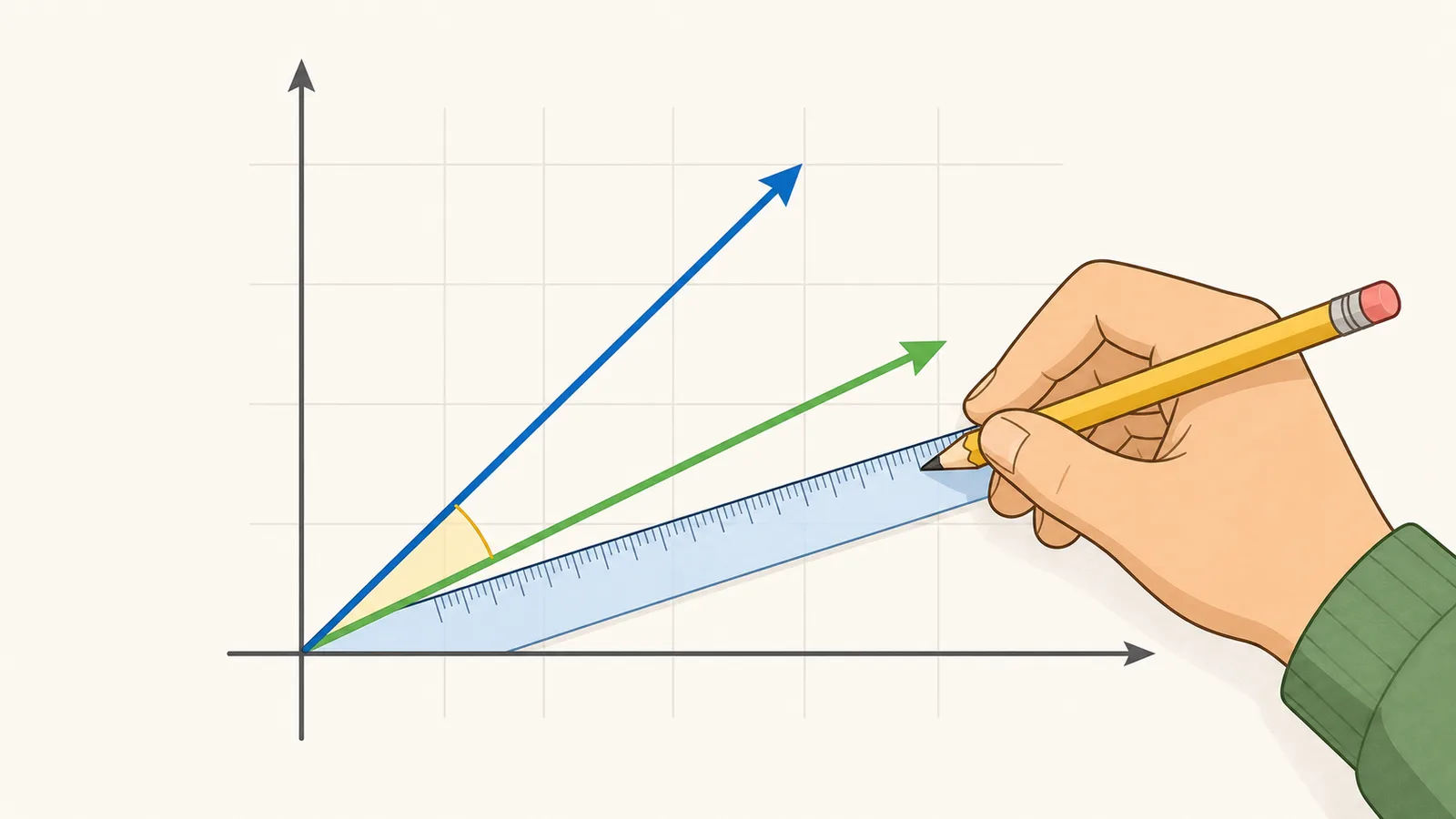
2D vector sketch
Visual check
The sketch rescales both vectors around one origin so you can sanity-check the
geometry before relying on the exact dot-product result.
In 2D mode, the smallest enclosed angle should match what you see here:
tight for acute cases, square for perpendicular vectors, and wide for obtuse
ones.
Swapping vector 1 and vector 2 keeps the same enclosed angle, even though the
picture rotates.
Result sheet
Measure
Value
Interpretation
Angle
16.2602°
Smallest enclosed angle between the two directions.
Radians
0.283794
Useful for calculus, physics, and matrix work.
Dot product
24
Sign and size describe how aligned the vectors are.
Cosine similarity
0.96
A value close to 1 means the vectors are strongly aligned.
Relationship
Acute angle
Parallel and opposite vectors sit on the same line; perpendicular vectors meet at 90°.
Angle between vectors calculator: find the angle using the dot product
An angle between vectors calculator uses the dot product formula cos(θ) = (u·v)/(|u||v|) to find the smallest enclosed angle between two vectors in 2D or 3D space, while also showing whether the vectors are parallel, perpendicular, acute, or obtuse. This version keeps the dot product angle calculator workflow explicit, so you can read the cosine, the magnitudes, and the relationship label without doing the algebra by hand.
The dot product method
The dot product u·v equals |u||v|cos(θ). Rearranging gives θ = arccos(u·v / (|u||v|)). The result is always between 0° and 180°, which is why an angle between two vectors calculator reports the smallest enclosed angle rather than a signed turn.
That same relationship works in both 2D and 3D. It is the standard way to find the vector angle when you know the component form of each vector and want the geometric relationship that those components describe.
θ = arccos((u · v) / (|u| × |v|))
Angle between two vectors using the dot product.
u · v = |u||v|cos(θ)
Dot product identity that connects vector size and angle.
How to read the result
A positive dot product means the vectors point in generally similar directions, so the angle is acute or zero. A negative dot product means they point more against each other, so the angle is obtuse or exactly 180°.
If the dot product is zero and neither vector is zero-length, the vectors are perpendicular. The calculator also reports the cosine value and both magnitudes so you can see how the geometric relationship was formed, not just the final angle.
Worked example
For vectors u = (3, 4) and v = (4, 3), the dot product is 3×4 + 4×3 = 24. Both magnitudes are 5, so cos(θ) = 24 / (5×5) = 0.96.
Taking arccos(0.96) gives an angle of about 16.26°. That tells you the vectors are close to parallel but not perfectly aligned. If you switched to a 3D example such as (1, 0, 0) and (0, 1, 0), the same formula would give 90° because the dot product is zero.
Cosine similarity and directional alignment
The cosine value on this page is the same normalized directional measure used in cosine similarity. A value near 1 means the vectors point almost the same way, 0 means they are perpendicular, and -1 means they point in opposite directions. That makes an angle between vectors calculator useful beyond homework: it is also a compact way to describe directional alignment in graphics, physics, robotics, and data-science workflows.
Keeping both the cosine value and the angle on screen helps with interpretation. In some tasks you care about the angle in degrees because you are checking geometry directly. In others you care about the normalized alignment score because the vector lengths differ wildly. This page surfaces both so you can move from a textbook dot-product problem to a cosine-similarity or direction-comparison task without rebuilding the inputs.
Why the zero vector cannot be used
The zero vector has no direction, so there is no meaningful angle to measure against it. The denominator in the dot product formula also becomes zero because one magnitude is zero, which makes the calculation undefined.
That is why a correct angle between vectors calculator must reject any input where either vector is the zero vector instead of trying to substitute a default result.
Degrees, radians, and vector notation
Most users want degrees because they are easier to compare against familiar right-angle, acute, and obtuse examples. The same result can also be shown in radians, which is useful in calculus, physics, and matrix work.
This page is also a vector angle calculator and a dot product calculator workflow in disguise: the dot product gives the cosine, the cosine gives the angle, and the relationship label tells you whether the vectors are parallel, opposite, perpendicular, acute, or obtuse.
Angle between vectors vs direction angle of a vector
Searchers often mix up two related ideas: the angle between two vectors and the direction angle of a single vector. An angle between vectors calculator compares two directions directly and returns the smallest enclosed angle between them. A direction angle calculator, by contrast, measures one vector against the coordinate axes or against a fixed reference direction. The formulas and interpretation are different, even though both live inside linear algebra.
That distinction matters in coursework and applied problems. If you already have two vectors such as force and displacement, or two displacement vectors in 2D or 3D space, the dot product formula on this page is the right tool. If you instead need the orientation of one vector relative to the x-axis, y-axis, or z-axis, you need an axis-angle or direction-cosine workflow rather than an angle-between-two-vectors calculator.
Common mistakes and interpretation tips
The most common mistake is trying to use the zero vector. Because the zero vector has no direction, the angle is undefined and a trustworthy calculator must stop instead of returning a fake 0° or 90° answer. Another common mistake is rounding too early. If two vectors are nearly parallel or nearly opposite, small rounding changes in the cosine ratio can move the final angle by more than you expect.
Units also matter for interpretation even though the formula itself is unit-consistent. If both vectors describe the same physical quantity in matching units, the enclosed angle is meaningful as a directional comparison. If the components were assembled from mismatched units or from coordinates that should first be converted into vector form, the computed angle may be algebraically valid but physically misleading.
A good angle between two vectors calculator with steps therefore does more than print one number. It shows the dot product, both magnitudes, the cosine value, and the relationship label, so you can tell whether the vectors are nearly aligned, exactly perpendicular, or leaning in opposite directions before you move on to a projection, cross product, or direction-angle task.
When to use a different calculator
If you need to measure how much of one vector lies along another, use a projection calculator. If you need the size of a vector, use a vector magnitude calculator. If you need the normalized direction only, use a unit vector calculator.
This page stays focused on the angle between vectors formula so the answer is easy to trust, easy to explain, and easy to compare against a textbook or classroom example.
Frequently asked questions
Can the angle be greater than 180°?
No. The angle between two vectors is defined as the smallest angle between them, so it is always between 0° and 180° inclusive.
What if one vector is the zero vector?
The angle is undefined because the zero vector has no direction. The calculator returns no result in this case instead of guessing.
Why does a zero dot product mean perpendicular vectors?
Because the dot product formula is u·v = |u||v|cos(θ). When neither vector has zero length, a zero dot product forces cos(θ) to be zero, which happens at 90°.
Does this work for 2D and 3D vectors?
Yes. The same dot product relationship works in any dimension as long as both vectors have the same number of components. This route supports the most common 2D and 3D cases.
What does a negative dot product mean?
A negative dot product means the vectors point more against each other than in the same direction. That produces an obtuse angle, and a perfectly opposite pair gives 180°.
What does a positive dot product mean?
A positive dot product means the vectors have a component in the same direction. The angle is acute unless the vectors are exactly parallel, in which case it is 0°.
Do I need to normalize the vectors first?
No. The dot product formula uses the original vectors and their magnitudes directly. Normalization is not required unless your course or workflow specifically asks for unit vectors.
Why does the calculator show radians too?
Radians are often preferred in calculus, physics, and engineering because they fit naturally into trigonometric and rotational formulas. Showing both units makes the result easier to reuse.
Can I use coordinates from geometry problems?
Yes, as long as the coordinates are converted into vector components first. The formula works the same way whether the vector came from a physics problem, a geometry diagram, or a matrix exercise.
How is this different from a dot product calculator?
A dot product calculator may stop after returning the scalar dot product. This page continues one step further and converts that dot product into the enclosed angle, which is the value many users actually need.
Is the angle between two vectors the same as a direction angle?
No. The angle between two vectors compares one vector directly with another vector. A direction angle measures one vector against a coordinate axis or other fixed reference direction. They are related ideas, but they answer different questions.
Why does the calculator clamp the cosine value before using arccos?
Floating-point rounding can produce a cosine ratio like 1.0000000001 or -1.0000000001 even when the mathematically correct value is exactly 1 or -1. Clamping keeps the value inside the valid arccos range so nearly parallel or nearly opposite vectors do not trigger a false error.
Can I compare vectors from physics, graphics, or machine-learning problems here?
Yes, if both vectors are expressed in matching component form. The same angle-between-vectors formula is used for force and displacement in physics, normal comparisons in graphics, and directional similarity checks in higher-dimensional workflows, even though this page itself stays focused on the common 2D and 3D cases.
Is this the same as cosine similarity?
They are closely related. Cosine similarity is the cosine term from the same dot-product identity, so it measures directional alignment on a scale from -1 to 1. This calculator shows that cosine value and then converts it into the enclosed angle, which is often easier to interpret in geometry, physics, and engineering settings.