Calculate the cross product of two 3D vectors with steps, area, unit normal, right-hand-rule direction, and reversed-order checks.
Last updated
Cross product calculator Compute the cross product of two 3D vectors, including determinant steps, perpendicularity checks, area, angle context, and the reversed-order comparison.
Quick examples
Choose a preset to test a standard basis result, a surface normal, or the zero-vector parallel case.
Vector 1 (u)
Vector 2 (v)
What is the cross product?
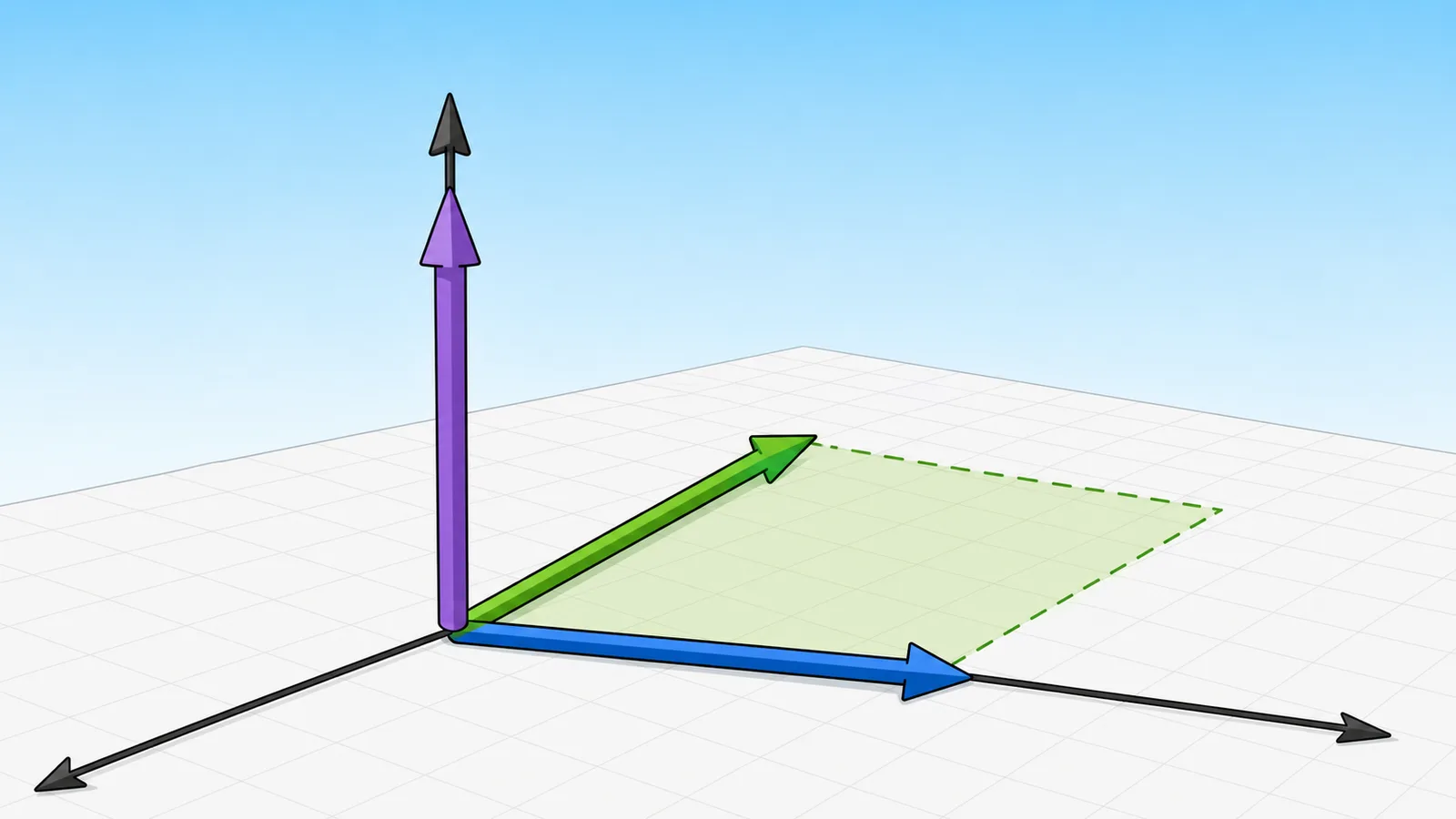
The cross product of two 3D vectors produces a third vector that is perpendicular to both inputs, with a magnitude equal to the area of the parallelogram they span.
Right-hand rule
The direction of the resulting vector follows the right-hand rule: point your fingers along the first vector, curl them toward the second, and your thumb points in the direction of the cross product.
Result
(-3, 6, -3)
The result vector (-3, 6, -3) is perpendicular to both input vectors.
Result vector
(-3, 6, -3)
Magnitude
7.348469
Area
7.348469
Triangle area: 3.674235
Input relationship
Acute input angle
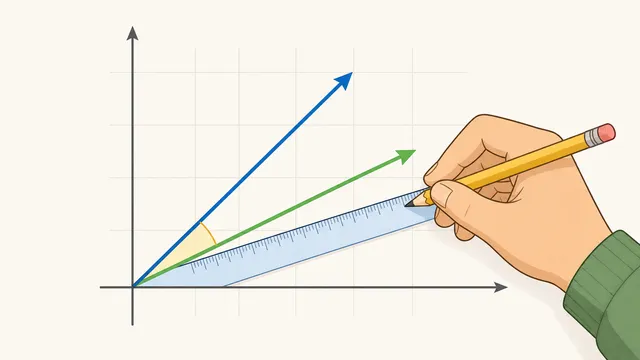
7.475791° between inputs
Interpretation checks
Unit normal: (-0.408248, 0.816497, -0.408248)
Reverse order: v × u = (3, -6, 3), so changing the order flips the direction.
Perpendicularity: (u × v) · u = 0 and (u × v) · v = 0.
Step-by-step
u × v = (u₂v₃ − u₃v₂, u₃v₁ − u₁v₃, u₁v₂ − u₂v₁)
x = (3)(7) − (4)(6) = 21 − 24 = -3
y = (4)(5) − (2)(7) = 20 − 14 = 6
z = (2)(6) − (3)(5) = 12 − 15 = -3
|u × v| = √(-3² + 6² + -3²) = √54 = 7.348469
Area check: parallelogram area = |u × v| = 7.348469; triangle area = |u × v| / 2 = 3.674235
Perpendicularity check: (u × v) · u = 0 and (u × v) · v = 0
Cross product calculator: compute the cross product of two 3D vectors
A cross product calculator computes the vector perpendicular to two input vectors in three-dimensional space. The result tells you not only the perpendicular direction, but also the magnitude of that vector, which equals the area of the parallelogram spanned by the inputs. That makes the cross product useful in linear algebra, geometry, physics, graphics, and any workflow where orientation in 3D space matters.
The cross product formula
For vectors u = (u₁, u₂, u₃) and v = (v₁, v₂, v₃), the cross product u × v = (u₂v₃ − u₃v₂, u₃v₁ − u₁v₃, u₁v₂ − u₂v₁).
The magnitude |u × v| equals |u||v|sin(θ), representing the area of the parallelogram formed by the two vectors.
u × v = (u₂v₃ − u₃v₂, u₃v₁ − u₁v₃, u₁v₂ − u₂v₁)
Cross product of 3D vectors. This is the specific relationship the calculator applies when building the result.
|u × v| = |u||v|sin(θ)
The magnitude of the cross product equals the area of the parallelogram formed by the two vectors.
What the result vector tells you
The cross product returns a new vector that is perpendicular to both input vectors. That perpendicular relationship is why the cross product is used to compute surface normals, torque direction, angular momentum direction, and orientation in 3D graphics.
The sign and order matter. Swapping the input vectors reverses the direction of the result, so u × v points the opposite way from v × u. The calculator keeps the vector order explicit because the same numbers in reverse order describe a different oriented result.
Direction: perpendicular to both input vectors
Magnitude: area of the parallelogram spanned by the inputs
Order sensitivity: swapping vectors flips the result direction
Zero vector result: parallel vectors or a zero vector input
Area, angle, and perpendicularity checks
A useful cross product calculator with steps should not stop at the vector alone. The magnitude |u × v| is also the parallelogram area spanned by the input vectors, while half that value gives the triangle area. This is why the same calculation appears in geometry area problems, mesh-normal checks, and torque-style physics problems.
The calculator also checks perpendicularity by taking dot products between the result vector and each input vector. For a correctly computed cross product, (u × v) · u and (u × v) · v should both be zero apart from small rounding effects. Seeing that verification makes the result easier to trust than a bare vector answer.
Parallelogram area = |u × v|
The magnitude of the cross product is the area spanned by the two input vectors.
Triangle area = |u × v| / 2
A triangle using the same two side vectors has half the parallelogram area.
(u × v) · u = 0 and (u × v) · v = 0
Perpendicularity verification for the result vector.
How the right-hand rule fits in
The right-hand rule helps interpret the direction of the cross product in 3D space. Point the fingers of your right hand along the first vector, curl them toward the second vector, and your thumb points in the direction of the cross product. This is the standard orientation convention used in physics and engineering.
That rule matters because the cross product is not just a size calculation. Two vector pairs can span the same area but point in opposite perpendicular directions depending on the order of the inputs. The right-hand rule is what tells you which orientation applies.
When the cross product is zero
If the result is the zero vector, then either the two vectors are parallel, antiparallel, or at least one input is itself the zero vector. In all of those cases, the parallelogram area collapses to zero, so there is no non-zero perpendicular result.
This is useful in practice because a zero cross product is a quick test for parallelism in 3D. It does not tell you that the vectors point the same way, only that they lie on the same line or one of them has no direction.
Further reading
Wikipedia — Cross product — Reference overview covering cross-product definition, geometry, and common applications in 3D space.
Common mistakes when using a vector product calculator
The most common mistake is reversing the vector order. Because the cross product is anti-commutative, u × v and v × u have the same magnitude but opposite directions. If a surface normal, torque vector, or orientation check points the wrong way, check the input order before assuming the arithmetic is wrong.
Another common mistake is treating a zero result as a calculator failure. A zero cross product is a meaningful geometric signal: the vectors are parallel, antiparallel, or one vector is zero, so they do not span a non-zero area. In applied work, that can reveal a degenerate triangle, a force applied through a pivot line, or an input pair that cannot define a unique normal.
Finally, remember that this page works with real-valued 3D component vectors. If your original problem is written as points, first subtract coordinates to form direction or edge vectors. If your vectors carry physical units, make sure the components use compatible units before interpreting area, torque, or angular-momentum meaning.
Frequently asked questions
Is the cross product commutative?
No. The cross product is anti-commutative: u × v = −(v × u). Swapping the operands keeps the magnitude and area the same, but every result-vector component changes sign because the right-hand-rule direction reverses.
Does the cross product work in 2D?
The vector cross product on this page is a 3D operation. For 2D inputs, many courses and calculators embed the vectors in 3D with z = 0, which produces a result along the k-axis: (0, 0, u₁v₂ − u₂v₁). That scalar k-component is useful for signed area and orientation, but it is still being interpreted through the 3D convention.
What does a zero cross product mean?
A zero cross product means the vectors are parallel, antiparallel, or one of the vectors is the zero vector. In each case, the parallelogram area is zero and there is no unique non-zero perpendicular direction. This is a useful diagnostic in geometry, graphics, and physics because it flags collinear or degenerate inputs.
Why does vector order matter in a cross product?
Vector order matters because the right-hand rule is directional. Curling from u toward v points your thumb one way, while curling from v toward u points it the opposite way. The magnitude stays the same, but reversing the order flips the sign of every component in the result.
How do you calculate the cross product step by step?
Use the determinant expansion with i, j, and k in the first row, the first vector in the second row, and the second vector in the third row. The components are u₂v₃ − u₃v₂, u₃v₁ − u₁v₃, and u₁v₂ − u₂v₁. The calculator shows those substitutions directly so you can audit each component.
What is the geometric meaning of cross product magnitude?
The magnitude |u × v| is the area of the parallelogram formed by the two vectors. Half of that value is the area of the triangle using the same two side vectors. If the magnitude is small relative to the input lengths, the vectors are close to parallel; if it is large, they are closer to perpendicular.
How is the cross product different from the dot product?
The dot product returns a scalar that measures directional alignment, while the cross product returns a vector perpendicular to both inputs. A dot product is largest when vectors point the same way; a cross product magnitude is largest when vectors are perpendicular.
What is a unit normal from a cross product?
A unit normal is the cross product divided by its own magnitude. It keeps the perpendicular direction but normalizes the length to 1. Unit normals are common in 3D graphics, geometry, robotics, and physics workflows, but they are undefined when the cross product is the zero vector.
Can I use the cross product for surface normals?
Yes. If you have three points on a triangle, subtract coordinates to create two edge vectors from the same starting point, then compute their cross product. The result is perpendicular to the triangle plane. Reversing the edge order flips the normal direction, which can change lighting or front-face orientation in graphics software.
Why does the calculator show perpendicularity checks?
A correct cross product should be perpendicular to both input vectors, so dotting the result with either input should give zero apart from rounding effects. These checks help catch transcription mistakes and make the vector product easier to verify by hand.