Use this Doppler effect calculator to estimate observed sound frequency, hertz shift, pitch-change percentage, source and observer speed effects.
Last updated
Model a classical sound-wave Doppler shift Use source frequency, sound speed, speed units, and straight-line source and observer motion to estimate observed frequency, pitch shift, and the difference between approaching and receding sound.
Quick sound examples
A 700 Hz source moving through room-temperature air at about 60 mph.
Direction
Sound speed presets
A common classroom reference for dry air near 20 °C.
Use a sound speed that matches the medium you care about. For air near room temperature, a common reference is about 343 m/s, 1,235 km/h, or 767 mph.
Classical sound model
Enter non-negative speeds measured along the line between the source and observer. The calculator converts the selected speed unit to m/s internally before applying the Doppler equation.
Result
759.81 Hz
The observer hears a frequency ratio of 1.0854× relative to the emitted sound in this approaching scenario.
The source is moving at Mach 0.08 and the observer at Mach 0, modeled as straight-line motion toward each other.
Frequency shift
59.81 Hz
Shift percentage
8.54%
Emitted frequency
700 Hz
Direction
approaching
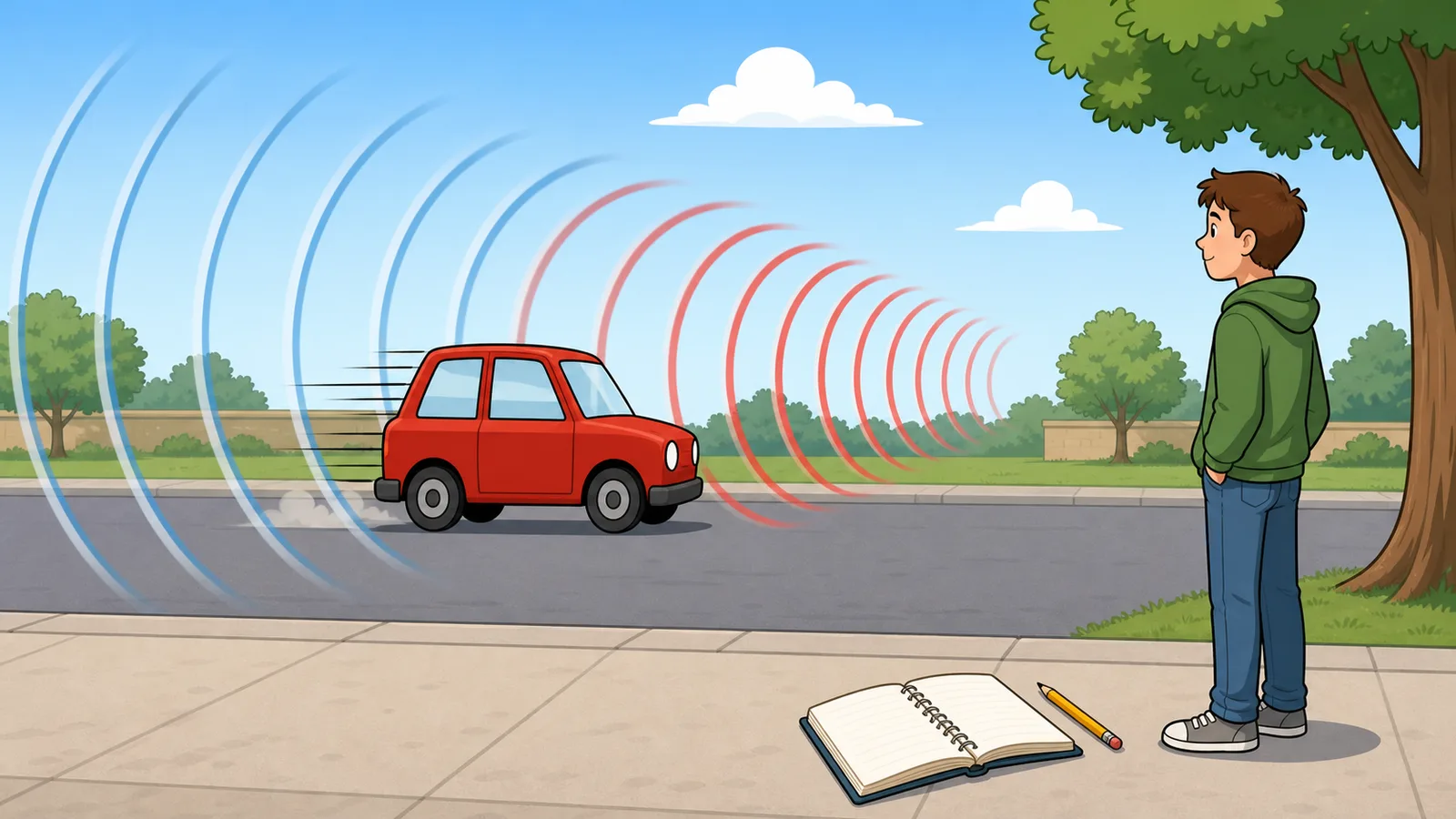
Approaching motion raises the observed pitch The wavefronts are compressed, so the observer hears a higher frequency. This result is 59.81 Hz above the emitted frequency in the classical sound-wave model.
Approaching versus receding comparison
Keeping the same frequency and speeds, the table shows how the direction choice changes the observed pitch.
Direction
Observed frequency
Shift
Change
approaching
759.81 Hz
59.81 Hz
8.54%
receding
648.92 Hz
-51.08 Hz
-7.3%
Formula used
f' = f × (v + v_observer) ÷ (v - v_source)
Model note
This page models straight-line motion in a medium with a single sound speed. It does not cover relativistic Doppler shifts, angled motion, or shock-wave and sonic-boom effects.
Use this Doppler effect calculator to estimate the observed frequency heard by a listener when a sound source, observer, or both move through a medium. It works as a sound Doppler shift calculator, observed frequency calculator, and classroom worksheet for approaching versus receding motion, with speed units, medium presets, pitch-shift percentages, and subsonic guardrails shown in the same result.
What this Doppler effect calculator solves
For sound waves, the Doppler effect compares the emitted frequency with the frequency an observer actually hears after source and observer motion compresses or stretches the spacing of the wavefronts in the medium. Approaching motion raises the observed pitch because the wavefronts arrive closer together, while receding motion lowers the pitch because the wavefronts spread farther apart.
The calculator covers the practical classroom version of the problem: source frequency, speed of sound, source speed, observer speed, and whether the motion is approaching or receding along one line. It then returns observed frequency, frequency shift in hertz, percentage pitch change, the formula used, and a side-by-side approaching versus receding comparison for the same speeds.
The classical sound-wave equations used here
For an approaching case, the calculator uses f′ = f × (v + v_o) ÷ (v − v_s), where f is emitted frequency, v is the speed of sound in the medium, v_o is observer speed toward the source, and v_s is source speed toward the observer.
For a receding case, it uses f′ = f × (v − v_o) ÷ (v + v_s). The page then compares the observed result with the emitted frequency to show the absolute shift in hertz and the percentage change in pitch.
f′ = f × (v + v_o) / (v - v_s)
Use this approaching-source form when the source and observer move toward each other along the sound path.
f′ = f × (v - v_o) / (v + v_s)
Use this receding-source form when the source and observer move away from each other along the sound path.
pitch shift % = (f′ / f - 1) × 100
The calculator uses this ratio to show whether the heard pitch is higher or lower than the emitted frequency.
Why speed units and sound speed presets matter
Many Doppler effect examples describe cars, trains, aircraft, or sirens in miles per hour or kilometres per hour, while the equation is usually written in metres per second. The calculator lets you work in m/s, km/h, or mph and converts the speeds internally so the equation stays physically consistent.
The speed of sound is not a universal constant. Air near room temperature is commonly approximated as 343 m/s, but colder air, warmer air, and water use different values. Choosing a sound-speed preset before entering source and observer speeds makes the assumptions visible instead of hiding them inside a default.
Worked example: 440 Hz source approaching at 30 m/s
Suppose a 440 Hz sound source moves toward a stationary observer at 30 m/s while sound travels through air at 343 m/s. Substituting those values into the approaching equation gives an observed frequency of about 482.17 Hz.
That means the heard pitch is 42.17 Hz higher than the emitted pitch, which is about a 9.58% increase. This kind of example is useful for checking whether the sign of the motion and the choice of approaching versus receding direction match the physical situation you want to model.
How to read approaching versus receding results
A common Doppler-effect mistake is treating source speed and observer speed as if they simply add to or subtract from frequency directly. The comparison table helps prevent that by showing both directions with the same entered speeds. If the source and observer approach each other, the denominator and numerator make the heard frequency higher. If they recede, the heard frequency falls.
This is especially useful for pass-by problems such as sirens, train horns, or moving listeners. The same emitted frequency can sound high before the pass and low after the pass, while the physical source frequency has not changed.
Subsonic and near-sonic limits
This calculator is intentionally limited to classical sound in a medium. It rejects source or observer speeds that reach the entered sound speed because the simple straight-line equation no longer describes shock-wave or sonic-boom behavior.
Even before Mach 1, near-sonic inputs can be sensitive. When the fastest entered motion is above Mach 0.8, the page warns that the simple classroom model needs extra care. Use a more advanced acoustics or aerodynamics model for transonic, supersonic, angled, or safety-critical cases.
Where this simplified model stops being reliable
This page does not model relativistic Doppler shift for light, radar Doppler velocity, medical-ultrasound instrumentation, off-axis motion, wind gradients, turbulence, or changing medium conditions. Those problems use related ideas, but not the same direct sound-wave equation.
The sound speed must also match the medium and conditions you are studying. Air near room temperature is commonly approximated as 343 m/s, but the correct value changes with temperature and with other media such as water or solids.
Compare with related calculators
Use this Doppler shift calculator when the question is about observed sound frequency from moving sources or listeners. If you are comparing general frequency values without motion, a frequency or wavelength calculator is usually the better tool.
If the search intent is radar, light, redshift, or relativistic physics, do not reuse this page's sound-wave answer. Those models treat wave speed and reference frames differently, so the right calculator needs domain-specific formulas.
The Doppler effect is the change in observed frequency caused by relative motion between a wave source and an observer. For sound, approaching motion makes the heard pitch higher and receding motion makes it lower.
How do I calculate observed frequency for sound?
Enter the emitted frequency, speed of sound, source speed, observer speed, and direction. The calculator applies the classical sound-wave Doppler equation and returns the observed frequency, hertz shift, and percentage pitch change.
Why does approaching motion increase the observed frequency?
Approaching motion compresses the spacing between successive wavefronts reaching the observer, so more crests arrive each second. More arriving crests per second means a higher observed frequency and a higher heard pitch.
Why does receding motion lower the pitch?
When the source and observer move away from each other, the wavefront spacing at the observer is stretched. Fewer crests arrive per second, so the observed frequency is lower than the emitted frequency.
What speed of sound should I enter?
Use a value that matches the medium and conditions you care about. For room-temperature air, 343 m/s is a common reference, but water, solids, and colder or hotter air all require different speeds.
Can I enter speeds in mph or km/h?
Yes. Choose m/s, km/h, or mph before entering source speed, observer speed, and sound speed. The calculator converts those speeds to metres per second internally before applying the equation.
Why must the source and observer speeds stay below the sound speed?
The classical equation used here assumes ordinary subsonic propagation through a medium. Once source or observer speeds reach or exceed the sound speed, shock-wave and sonic-boom effects matter and the simple equation is no longer valid.
What does a negative frequency shift mean?
A negative frequency shift means the observed frequency is lower than the emitted frequency. That is the expected result for a receding sound source or listener.
Can I use this calculator for light, radar, or redshift?
No. Light, radar, and redshift problems require electromagnetic or relativistic Doppler models, not the classical sound-wave equation used on this page. This calculator is only for sound in a medium.
Does the calculator handle moving source and moving observer at the same time?
Yes. Enter non-negative source and observer speeds measured along the line between them. The calculator includes both in the numerator and denominator according to the selected approaching or receding direction.